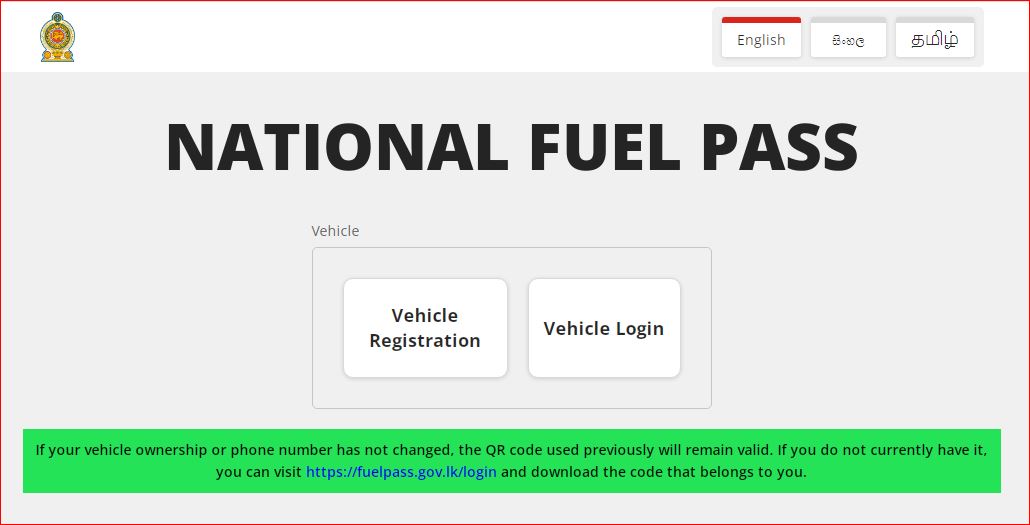

The Sri Lankan government reintroduced the National Fuel Pass system, a QR code-based fuel quota mechanism, effective from 6:00 a.m. on March 15, 2026. This move addresses supply disruptions from geopolitical tensions in the Middle East, rising domestic demand, and the need to prevent hoarding or black-market sales. Fuel stations will not dispense petrol or diesel without scanning a valid QR code linked to a registered vehicle.
The system, originally used during the 2022 economic crisis and discontinued in September 2023, allocates fixed weekly fuel quotas by vehicle category to ensure equitable distribution and sustain essential economic activities.
Weekly Fuel Quotas (as announced by the Ministry of Energy)
– Motorcycles: 5 litres per week
– Motor cars and three-wheelers: 15 litres per week
– Vans: 40 litres per week
– Buses: 60 litres per week
– Motor lorries: Up to 200 litres per week
– Special purpose vehicles 40 litres per week
– Quadricycles: 5 litres per week
– (Other categories like land vehicles may have specific allocations, e.g., around 25 litres in some reports)
Quotas refresh weekly (typically Sunday night), but unused amounts do not carry forward. Special provisions exist for essential services and national production vehicles.
How to Obtain or Access Your Fuel QR Code
The process uses the official portal at https://fuelpass.gov.lk. Registration is free and online. No fuel will be sold without this QR code.
1. For previous users (registered before the 2023 discontinuation):
– If your vehicle ownership and registered mobile number remain unchanged: Log in via the “Vehicle Login” section from midnight March 14, 2026 (or as soon as available), and download your existing QR code.
– If either has changed: Re-register as a new user starting 6:00 a.m. on March 15, 2026.
2. For new users or those never registered (e.g., new vehicle owners):
– Visit https://fuelpass.gov.lk starting 6:00 a.m. on March 15, 2026.
– Click “Vehicle Registration.”
– Enter your National Identity Card (NIC) number and mobile number.
– Provide vehicle details (registration number, type/category, etc.).
– Complete verification (likely via OTP sent to your mobile).
– Once approved, your unique QR code appears—save it to your phone (as an image or in a wallet app) or print it.
3. Using the QR code at fuel stations:
– Present the QR code (digital or printed) when purchasing fuel.
– The attendant scans it to verify eligibility and deduct from your weekly quota.
– You can only purchase up to your remaining allocated amount that week.
Tips and Important Notes
– Act quickly: Long queues formed at stations shortly after the March 15 rollout, so register early.
– The system aims to reduce lines and ensure fair access, but initial teething issues (like website traffic) may occur.
– For updates or issues: Monitor official Ministry of Energy announcements or reliable news sources.
– An unofficial companion app existed in the past for viewing quotas/QR codes via OTP login, but use the official website as the primary source.
– Essential service vehicles may follow separate procedures—check official notices if applicable.
This reintroduction reflects contingency planning amid global uncertainties. Register promptly via the official portal to avoid disruptions in fuel access. Stay informed through government channels for any quota adjustments or extensions.